

HOW IT WORKS
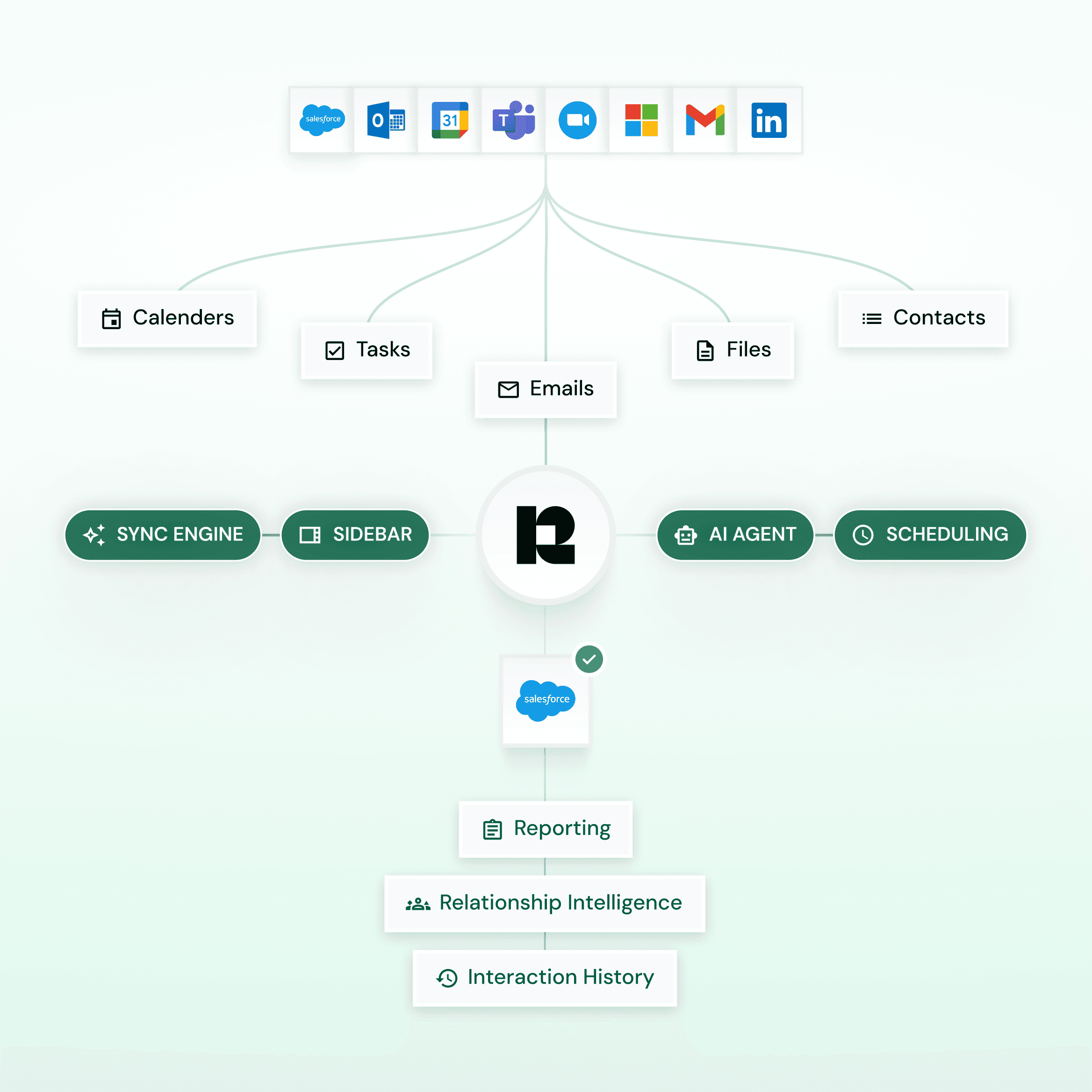
Complete Activity Sync
Automatic or semi-automatic capture of emails, meetings, contacts, tasks, and attachments from Outlook and Gmail into Salesforce.
Capture on Your Terms
Get complete control over capture rules and decide what is logged, how it’s stored, and what is excluded.
Built for Custom Workflows
Link activities to standard and custom Salesforce objects with configurable field mapping for clean, reporting-ready records.
CAPTURE & CONTROL
Beyond Activity Capture.
Run CRM Operations without any friction
Inbox Sidebar
Work with Salesforce directly from the inbox
Access complete client records and interaction history directly from email, with the ability to create, update and manage Salesforce records and tasks without switching systems.
Built-in AI assistance helps surface insights, answer questions, and provide instant client context as you work.


Calendar Sync
Sync calendars and prevent scheduling conflicts
Automatically keep Salesforce and Outlook/Gmail calendars in sync, including delegated and shared calendars, to avoid conflicts and missed meetings.
Personal events are excluded by default to keep Salesforce calendars clean, accurate, and reporting-ready.
Scheduling
Streamline meeting scheduling
Share available Time Slots or “Book Me” links directly from email, with delegation support for assistants scheduling on behalf of advisors.
Dynamic availability synced to Salesforce prevents double bookings and scheduling conflicts automatically.


AI Mentor
Interaction-driven intelligence for Salesforce
Ask contextual questions about clients or relationships and receive guidance based on captured interactions and history.
Automatically generate compliant-ready follow-ups, summaries, and notes, while identifying engagement gaps or stalled relationships early.
Data Governance
Controls
Precisely control what data is captured, excluded, and stored using configurable rules aligned to internal policies.
Enterprise Security & Compliance
Certified to SOC 2 Type II and ISO 27001, with encryption, access controls, and audit logs embedded at every layer.
Ownership & Deployment Flexibility
Retain full ownership of your data with flexible deployment options including cloud, private cloud, or on-premises environments.
Enterprise-Scale Performance
Maintain complete, searchable, and reportable client interaction records in Salesforce, supporting SEC, FINRA, and MiFID II requirements.
CAPABILITIES
Customised to your needs
Customize every aspect. Choose what to track, how to sync, and build the system that works for your team.
Custom object sync
Capture activities against both standard and custom Salesforce objects to support complex workflows.
Unlimited data retention
Your data stays in Salesforce as long as you need it. Indefinite data retention means no 24-month cap.
Salesforce Managed Package
Embed Revenue Grid via a native managed package with admin control, extended objects, and built-in reporting.
Automatic Record Creation
Automatically create Contacts and Accounts for new email and meeting participants.
Email Sidebar
Work with Salesforce directly from email—view records, manage activities, update client data without switching systems.
Attachment Syncing
Capture relevant attachments in Salesforce while applying rules to exclude sensitive or unnecessary files.
Accurate reporting without limits
Gain complete visibility into client interactions with detailed, activity-based engagement reporting in Salesforce.
Never lose historical data
Backfill and retain past emails and meetings in Salesforce to maintain a complete interaction history.
Enterprise-ready rollout
Roll out Revenue Grid organization-wide using admin-controlled deployment for fast, consistent adoption.
Flexible deployment
Deploy Revenue Grid in private cloud or on-premise to match your security and compliance requirements.
Enhanced security & compliance
Enterprise-grade encryption and security aligned with SOC 2 Type II, ISO 27001, and GDPR.
For the people who own Salesforce
Most activity-capture tools were designed without the admin in mind. Revenue Grid was designed with the admin first, then everyone else benefits. Here's what that looks like in practice.
1
Roll it out
Configure Once.
Propagate Everywhere.
Native managed package from AppExchange
Settings presets applied across profiles
Bulk user provisioning via AD or Google
One SF org, multiple RG environments
2
Governance
Stays Inside
Your Guardrails.
Permission sets respected, no escalation
Assignment and validation rules honored
Page layouts and custom buttons reflected
Custom objects without Flow workarounds
3
Observability
When Something Breaks,
You See Why.
One-click per-user connectivity checks
Categorized sync errors with timestamps
Last sync session visible per user
Adaptive sync to protect API limits
READY FOR WHAT'S CHANGING
Microsoft is retiring EWS in October 2026. Salesforce retired Salesforce for Outlook in 2024. Revenue Grid is already on the other side of both transitions — no surprise migrations, no scrambling.
/

ENTERPRISE - READY
Replace Einstein Activity Capture without the 6-month wall.
Backfill history well beyond EAC's retention window. Activity lives natively in Salesforce — your reports see the full picture, not a rolling six months.
/
SFO RETIREMENT
Migrate from Salesforce for Outlook without losing structure.
Custom categories, folders, and page layouts carry over. Run in parallel during cutover — no data loss, no rebuild.
/
EWS SUNSET
Supports both EWS and Graph in parallel. No forced cutover when Microsoft sunsets EWS in October 2026.

761
days saved
Vapotherm used Revenue Grid to auto-sync Outlook and Salesforce, capturing 110,000 emails without relying on their reps.

60%
improvement
Bessemer Trust chose Revenue Grid
to help their reps prioritise and
nurture their leads.
$30M
increase
Slalom Consulting used Revenue Grid to find new revenue opportunities in their existing pipeline

CUSTOMER VOICES
Trusted by
Revenue Teams Worldwide
The capabilities that matter most when activity capture has to work at enterprise scale — and where the industry standard falls short.

Darren Knapp,
Director, Global Operations at Slalom Consulting
Thanks to Revenue Grid, we fixed leaks in our revenue generation process and grew our business despite challenging economic conditions.

David Choate
Chief Operating Officer
I value the ease of use. I don't have to ask my sales team to do anything different. Sales and client services all use it, and Salesforce stays more up to date because of Revenue Grid.

Wes Burk
Chief Operating Officer
We replaced our previous capture tool without losing historical data, and the audit trail let us pass our annual InfoSec review without follow-up questions.

Frequently Asked Questions
1. I'm already using Einstein Activity Capture. Why should I switch to Revenue Grid?
2. How does automatic email logging to Salesforce work — do reps have to BCC or log anything by hand?
3. What happens to my emails after 6 months with Einstein Activity Capture?
4. Can Revenue Grid sync data with custom Salesforce objects?
5. Where does my data live? What deployment options are available?
6. What's the rollout process? Do reps need to install anything?
7. Does Revenue Grid respect Salesforce permission sets?
8. Does Revenue Grid support multiple email accounts per user?
9. How does Revenue Grid help with compliance (SOC 2, ISO 27001, GDPR, HIPAA)?
10. Will switching from Einstein Activity Capture cause data loss?
11. How quickly can I set up Revenue Grid?
