Your Email Platform Sets
Your Lightning Sync Deadline
October 2026 or April 2027

Microsoft 365 orgs lose calendar sync 1 October 2026 — silently, with no error. Google Workspace orgs have until 1 April 2027. Both dates end with Lightning Sync off and a replacement running.

If you use Microsoft 365

October 2026

Microsoft closes the connection Lightning Sync runs on. Calendar sync stops that day, silently. This is the deadline that lands first, and it lands hardest — because nothing warns you.

If you use Google Workspace

April 2027

Lightning Sync is switched off entirely, on every platform. Nothing before this date affects Google Workspace orgs, which is exactly why it catches them out — none of the coverage so far has been about you.

AUG 2026

Salesforce’s Deadline To Swap From The Old Pipe To The New One. One-Way — You Can't Switch Back.

OCT 2026

Lightning Sync Stops Syncing That Day — Calendars And Meetings Stop Appearing In Salesforce.

FEB 2027

Salesforce Deletes Four Of EAC's Reporting Features. Reports And Dashboards Built On Them Go Blank, With No Error Message.

APR 2027

Lightning Sync Is Switched Off Completely. Including For Companies Using Google, Who Haven't Been Affected.

IF YOU WAIT

What Stops Working,
In Order

Nothing throws an error. That's what catches teams out — sync goes quiet

and the gap grows from there.

Straight away

New meetings stop arriving

Meetings booked in Outlook or Google no longer appear on account records.

Within days

Reps notice before reports do

Someone opens an account to prep a call and can't see recent activity.

1–2 weeks

Activity data goes
stale

Last-contacted fields drift. Automation keyed to recent activity stops firing.

After that

The gap widens
quietly

No alert. The distance between calendar and CRM grows until someone rebuilds it.

Straight away

New meetings stop arriving

Meetings booked in Outlook or Google no longer appear on account records.

1–2 weeks

Activity data goes
stale

Last-contacted fields drift. Automation keyed to recent activity stops firing.

Within days

Reps notice before reports do

Someone opens an account to prep a call and can't see recent activity.

After that

The gap widens
quietly

No alert. The distance between calendar and CRM grows until someone rebuilds it.

The decision you're actually making

Both Options Get Activity into Salesforce.
Only Revenue Grid Lets You Set The Ruls.

With Revenue Grid You're Not Replacing a Sync Tool. You're Getting a Sync Engine You Can Shape.

Native activity-capture tools were designed without the admin in mind. Revenue Grid was designed with the admin first, then everyone else benefits. Here's what that looks like in practice.

The free default

On or Off — A Switch

Einstein Activity Capture is designed to be turned on. IIt applies one set of rules across your whole org — you can adjust a few settings, but most of its behavior is fixed. That's not a gap in the current release — it's how a free, bundled feature has to work.

Revenue Grid AC360

A Fully Configurable Sync Engine

Built to fit your workflows and your business requirements, not the other way round. You define what syncs and what never does, how far back history reaches, which objects it lands on including custom ones, who's covered, and where the data lives — by configuration rather than code, and reversibly.

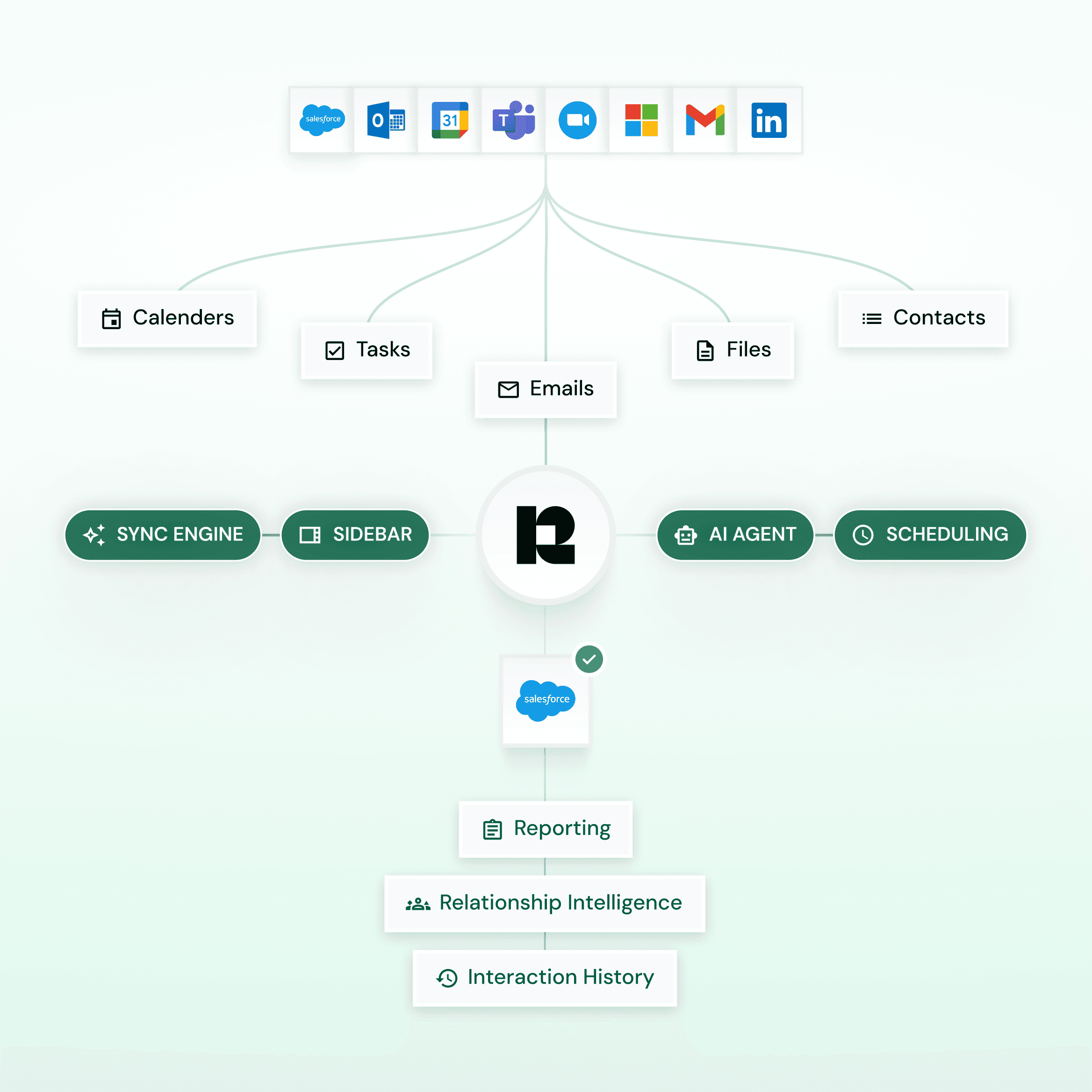
HOW IT WORKS

The Architecture, in Plain Terms

A native Salesforce managed package, a server-side connector to Outlook and Gmail, and configurable rules that decide what becomes a CRM record. No middleware, no workarounds — just the right things in the right places.

Revenue Grid automatically logging emails and meetings into the right Salesforce records.

Complete Activity Sync

Automatic or semi-automatic capture of emails, meetings, contacts, tasks, and attachments from Outlook and Gmail into Salesforce.

Capture on Your Terms

Get complete control over capture rules and decide what is logged, how it’s stored, and what is excluded.

Built for Custom Workflows

Link activities to standard and custom Salesforce objects with configurable field mapping for clean, reporting-ready records.

HOW IT WORKS

The Architecture, in Plain Terms

A native Salesforce managed package, a server-side connector to Outlook and Gmail, and configurable rules that decide what becomes a CRM record. No middleware, no workarounds — just the right things in the right places.

Revenue Grid automatically logging emails and meetings into the right Salesforce records.

Complete Activity Sync

Automatic or semi-automatic capture of emails, meetings, contacts, tasks, and attachments from Outlook and Gmail into Salesforce.

Capture on Your Terms

Get complete control over capture rules and decide what is logged, how it’s stored, and what is excluded.

Built for Custom Workflows

Link activities to standard and custom Salesforce objects with configurable field mapping for clean, reporting-ready records.

HOW IT WORKS

The Architecture, in Plain Terms

A native Salesforce managed package, a server-side connector to Outlook and Gmail, and configurable rules that decide what becomes a CRM record. No middleware, no workarounds — just the right things in the right places.

Revenue Grid automatically logging emails and meetings into the right Salesforce records.

Complete Activity Sync

Automatic or semi-automatic capture of emails, meetings, contacts, tasks, and attachments from Outlook and Gmail into Salesforce.

Capture on Your Terms

Get complete control over capture rules and decide what is logged, how it’s stored, and what is excluded.

Built for Custom Workflows

Link activities to standard and custom Salesforce objects with configurable field mapping for clean, reporting-ready records.

MORE THAN ACTIVITY CAPTURE

The Capabilities Your Team will
Actually Use Everyday.

Beyond capture itself, Revenue Grid ships the inbox, calendar, scheduling, and AI surfaces that keep work happening where reps already are.

Inbox Sidebar

Calendar Sync

Scheduling

AI CRM Assistant

Work with Salesforce
directly from the inbox

Access complete client records and interaction history directly from Outlook or Gmail, with the ability to create, update and manage Salesforce records and tasks without switching systems.

Built-in AI assistance helps surface insights, answer questions, and provide instant client context as you work.

RevenueGrid CRM analytics showing 34% more Salesforce data capture for improved revenue operations reporting.

MORE THAN ACTIVITY CAPTURE

The Capabilities Your Team will
Actually Use Everyday.

Beyond capture itself, Revenue Grid ships the inbox, calendar, scheduling, and AI surfaces that keep work happening where reps already are.

Inbox Sidebar

Calendar Sync

Scheduling

AI CRM Assistant

Work with Salesforce
directly from the inbox

Access complete client records and interaction history directly from Outlook or Gmail, with the ability to create, update and manage Salesforce records and tasks without switching systems.

Built-in AI assistance helps surface insights, answer questions, and provide instant client context as you work.

RevenueGrid CRM analytics showing 34% more Salesforce data capture for improved revenue operations reporting.

MORE THAN ACTIVITY CAPTURE

The Capabilities Your Team will Actually Use Everyday.

Beyond capture itself, Revenue Grid ships the inbox, calendar, scheduling, and AI surfaces that keep work happening where reps already are.

Inbox Sidebar

Calendar Sync

Scheduling

AI CRM Assistant

Work with Salesforce
directly from the inbox

Access complete client records and interaction history directly from Outlook or Gmail, with the ability to create, update and manage Salesforce records and tasks without switching systems.

Built-in AI assistance helps surface insights, answer questions, and provide instant client context as you work.

RevenueGrid CRM analytics showing 34% more Salesforce data capture for improved revenue operations reporting.

Where Einstein Activity Capture & Revenue Grid Differ

Side by Side,
Where It Matters

The differences that show up months after migration, not during it.

FEATURES

revenue grid

Einstein Activity Capture

Salesforce Lightning Sync

Historical Email Sync

Multi-year history + backfill

Limited retention: six months by default, five years with a paid version

No email sync at all — contacts and events only. Event backfill capped at 180 days

Custom object support

Native, no extra configuration

Requires Flows & setup

None

Email Auto-Cropping

Supports cropping, syncs only latest email to save storage

Saves full email chains

None

Email Attachments

Captured as Salesforce content

Limited / inconsistent

Not captured. No email sync, and event attachments explicitly don't sync

Reporting & analytics

Fully reportable in Salesforce

Limited visibility

Standard Salesforce reporting, but on contacts and events only no email data

Capture control

Granular rules & filters

Limited configuration

Config-level only: sync direction, contact filters, ≤180-day event window; no domain or content rules

Multiple email support

Supports multiple corporate + Microsoft 365 accounts per user

Does not support both account types simultaneously

One connection method and one Exchange server per org; aliases not supported

Selective logging

Accurate and selective logging; user-controlled via Outlook category or Google label

No user-controlled logging; Outlook categories or Google labels not supported

Outlook categories explicitly unsupported

Admin effort

Low, rule-based

Higher, requires workarounds

High and terminal — Exchange-side setup now, forced migration to EAC before April 2027

Why teams move to us

Built for Orgs Where
The Data Has to Be Right

900K+

revenue and operations
users worldwide

761

working hours
saved at Vapotherm

80%

caseload increase
at Morgan & Morgan

Trusted by 900K+ Salesforce Users Globally

Trusted by
800K+ Salesforce
Users Globally

CUSTOMER VOICES

Hear it Straight from
Our Customers

Wes Burk

Chief Operating Officer

We replaced our previous capture tool without losing historical data, and the audit trail let us pass our annual InfoSec review without follow-up questions.

Darren Knapp,

Director, Global Operations at Slalom Consulting

Thanks to Revenue Grid, we fixed leaks in our revenue generation process and grew our business despite challenging economic conditions.

David Choate

Chief Operating Officer

I value the ease of use. I don't have to ask my sales team to do anything different. Sales and client services all use it, and Salesforce stays more up to date because of Revenue Grid.

Get complete, accurateCRM data you can trust

Capture every interaction, eliminate noise, and ensure your CRM reflects reality — not guesswork.

20 minutes, tailored to your Salesforce setup

See migration from EAC or Legacy Solutions — including historical backfill

Free trial available with customizaton options to test unique business cases

Keep Salesforce records automatically updated with every customer interaction

Get a complete view of every account, contact, and opportunity in one place

Get complete, accurateCRM data you can trust

Capture every interaction, eliminate noise, and ensure your CRM reflects reality — not guesswork.

20 minutes, tailored to your Salesforce setup

See migration from EAC or Legacy Solutions — including historical backfill

Free trial available with customizaton options to test unique business cases

Keep Salesforce records automatically updated with every customer interaction

Get a complete view of every account, contact, and opportunity in one place

Frequently Asked Questions

1. We've extended the old connection. Are we fine?
2. Does October affect us if we're on Google Workspace?
3. Do we lose data that's already synced?
4. How long does migrating to Revenue Grid take?
5. Is this the same as the February Salesforce reporting change?