

Complete, Reliable Client
Interaction Data in Salesforce
Flexible by Design to
Support Diverse Workflows
HOW IT WORKS
A native Salesforce managed package, a server-side Salesforce connector for Gmail and Google Workspace, and configurable rules that decide what becomes a CRM record. No middleware, no workarounds — just the right things in the right places.
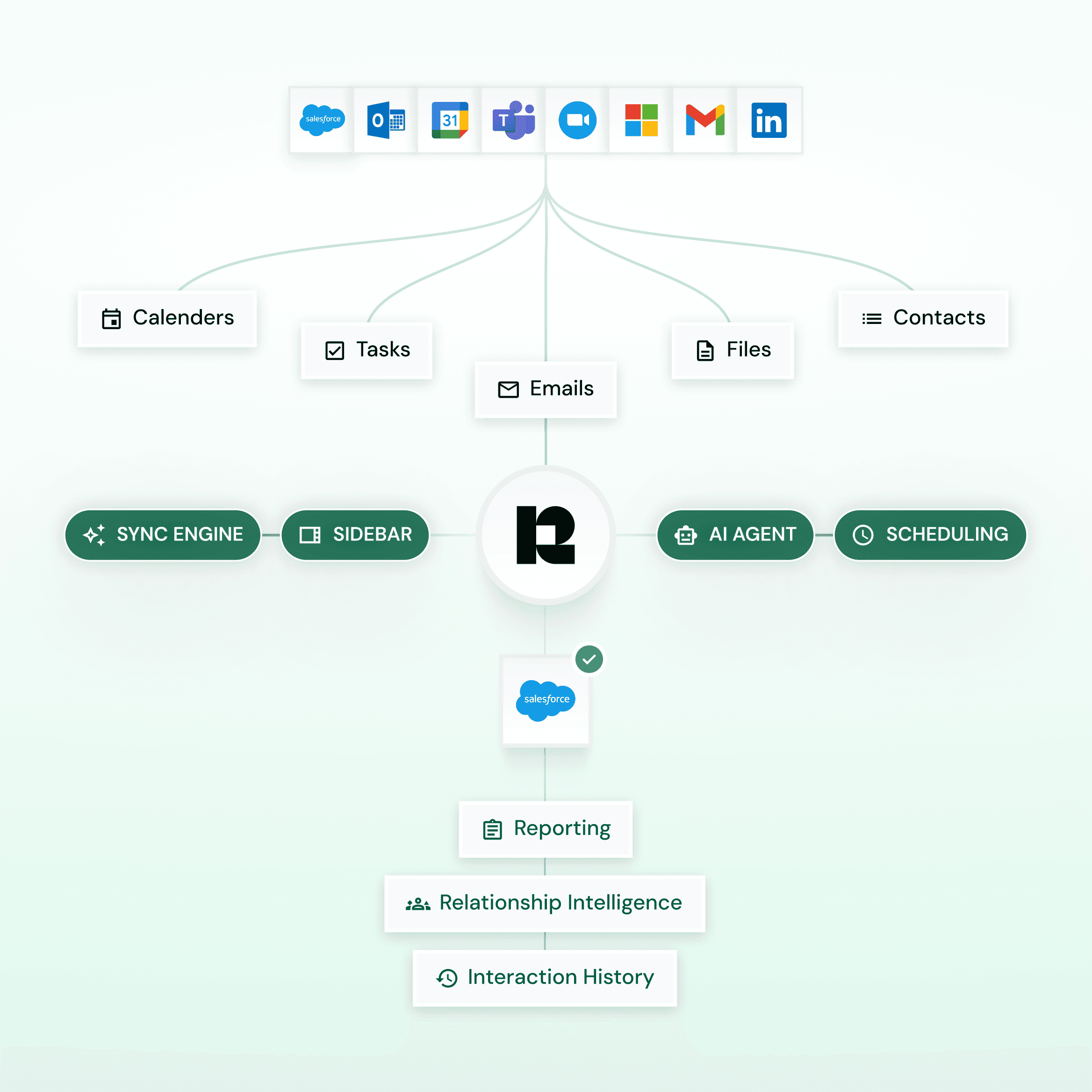
Complete Activity Sync
Automatic or semi-automatic capture of emails, meetings, contacts, tasks, and attachments from Gmail and Google Calendar into Salesforce.
Capture on Your Terms
Get complete control over capture rules and decide what is logged, how it’s stored, and what is excluded.
Built for Custom Workflows
Link activities to standard and custom Salesforce objects with configurable field mapping for clean, reporting-ready records.

Up and running in 15 minutes
1
Install the
managed package
Native from Salesforce AppExchange. No middleware, no servers to stand up, nothing custom to maintain.
2
Connect
Gmail or Google Workspace
Server-side connection over the Google Workspace API — reps add the Chrome extension, and IT stays in control.
3
Set your
capture rules
Decide what gets logged, how it's stored, and what's excluded. Org-wide defaults with per-user overrides.
READY FOR WHAT'S CHANGING
Microsoft is retiring EWS in October 2026. Salesforce retires Salesforce for Outlook on November 1, 2026. Revenue Grid is already on the other side of both transitions — no surprise migrations, no scrambling.
/

ENTERPRISE - READY
Replace Einstein Activity Capture without the 6-month wall.
Backfill history well beyond EAC's retention window. Activity lives natively in Salesforce — your reports see the full picture, not a rolling six months.
/
SFO RETIREMENT
Migrate from Salesforce for Outlook without losing structure.
Custom categories, folders, and page layouts carry over. Run in parallel during cutover — no data loss, no rebuild.
/
EWS SUNSET
Supports both EWS and Graph in parallel. No forced cutover when Microsoft sunsets EWS in October 2026.

Don't Settle for
Partial Activity Capture
FEATURES
revenue grid
Einstein Activity Capture
Salesforce Lightning Sync
Historical Email Sync
Multi-year history + backfill
Limited retention: six months by default, five years with a paid version
No email sync at all — contacts and events only. Event backfill capped at 180 days
Custom object support
Native, no extra configuration
Requires Flows & setup
None
Email Auto-Cropping
Supports cropping, syncs only latest email to save storage
Saves full email chains
None
Email Attachments
Captured as Salesforce content
Limited / inconsistent
Not captured. No email sync, and event attachments explicitly don't sync
Reporting & analytics
Fully reportable in Salesforce
Limited visibility
Standard Salesforce reporting, but on contacts and events only no email data
Capture control
Granular rules & filters
Limited configuration
Config-level only: sync direction, contact filters, ≤180-day event window; no domain or content rules
Multiple email support
Supports multiple corporate + Microsoft 365 accounts per user
Does not support both account types simultaneously
One connection method and one Exchange server per org; aliases not supported
Selective logging
Accurate and selective logging; user-controlled via Outlook category or Google label
No user-controlled logging; Outlook categories or Google labels not supported
Outlook categories explicitly unsupported
Admin effort
Low, rule-based
Higher, requires workarounds
High and terminal — Exchange-side setup now, forced migration to EAC before April 2027

400%
more activity in CRM
Average across enterprise deployments versus prior tool.
62%
increase in productivity
Time recovered from manual logging and lookup.
85%
reduction in data entry errors
Through automated, rule-based capture.
80%
less time on reporting
Clean CRM data means dashboards work the first time.
Security & proof
Built to pass the security review,
not just the demo
Data Governance
Controls
Precisely control what data is captured, excluded, and stored using configurable rules aligned to internal policies.
Audit-Ready Activity Records
Maintain complete, searchable, and reportable client interaction records in Salesforce, supporting SEC, FINRA, and MiFID II requirements.
Ownership & Deployment Flexibility
Retain full ownership of your data with flexible deployment options including cloud, private cloud, or on-premises environments.
Enterprise Security & Compliance
Certified to SOC 2 Type II and ISO 27001, with encryption, access controls, and audit logs embedded at every layer.
Pricing
Activity Capture 360
$30
user/month
Knowledge Capture
$49
user/month
Capture every touchpoint
automatically
Automated activity capture
Real-time Salesforce integration
Historical synchronization
Inbox and calendar Salesforce sidebar
Online scheduling and in-mail time slot booking
Admin & configuration controls
Native Salesforce activity reporting
Turn captured activity into
intelligence
Activity Capture 360, plus:
AI-powered chat and search across all sales data
Revenue-grade data lake
Record assistance
CUSTOMER VOICES
Hear it Straight from
Our Customers

Wes Burk
Chief Operating Officer
We replaced our previous capture tool without losing historical data, and the audit trail let us pass our annual InfoSec review without follow-up questions.


Darren Knapp,
Director, Global Operations at Slalom Consulting
Thanks to Revenue Grid, we fixed leaks in our revenue generation process and grew our business despite challenging economic conditions.

David Choate
Chief Operating Officer
I value the ease of use. I don't have to ask my sales team to do anything different. Sales and client services all use it, and Salesforce stays more up to date because of Revenue Grid.
Get complete, accurate
CRM data you can trust
Capture every interaction, eliminate noise, and ensure your CRM reflects reality — not guesswork.
20 minutes, tailored to your Salesforce setup
See migration from EAC or Legacy Solutions — including historical backfill
Free trial available with customizaton options to test unique business cases